

Notification management
Under Notifications you configure, as a workspace admin, who is informed automatically about scan events. The page is not an overview of received messages but a list of rules: each rule combines a channel (email or Slack) with an event type and a target. Rules can be created, edited, temporarily deactivated and deleted.
Structure of a rule
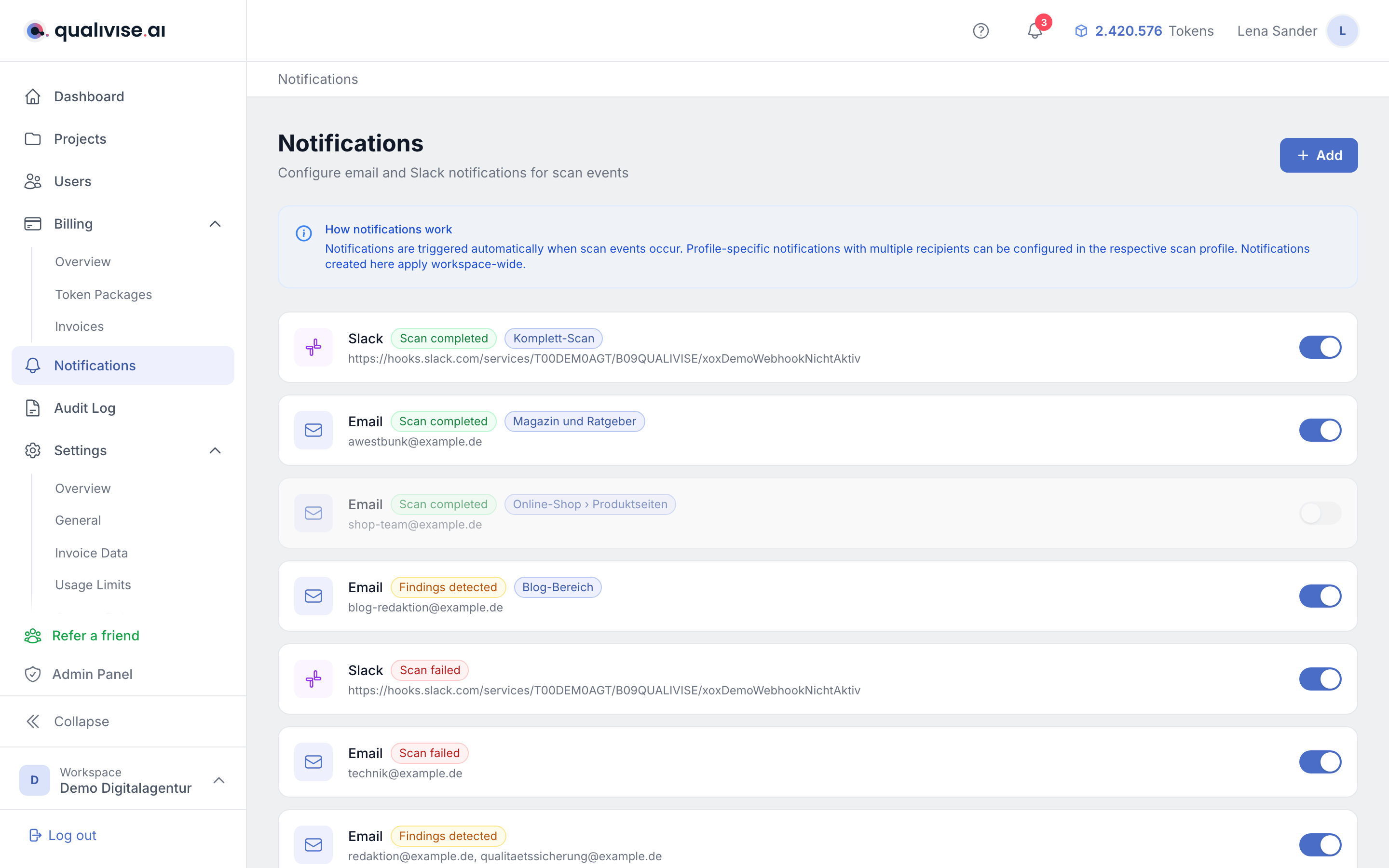
- Channel - either Email or Slack Webhook. The channel determines how the message is delivered.
- Event - the triggering scan event: Scan completed, Scan failed or Findings detected.
- Target - the recipient address or the webhook URL to which qualivise.ai sends the message.
Creating a rule
- Add - the button in the top right opens the "New notification" form.
- Channel and event - both are chosen from select fields; the event list contains the three types named above.
- Enter the target - for email enter an address in the format
team@example.com, for Slack an incoming webhook URL in the formathttps://hooks.slack.com/services/.... The hint below the field changes with the selected channel. - Multiple recipients - for email you can store several comma-separated addresses in one target; all of them receive the message.
Email and Slack compared
- Email - the message is sent as a formatted email to the stored address and names workspace, project and scan profile where known.
- Slack - qualivise.ai sends the subject and the message text to the stored webhook URL; the message appears in the channel the webhook was set up for in Slack.
- Creating a webhook - the URL comes from your Slack configuration (incoming webhooks). The address is not validated when you save: a typo only surfaces once the event occurs and the message fails to arrive. So trigger a scan on purpose after setting the rule up and check the channel.
Editing, deactivating and deleting rules
- Edit - clicking a list entry opens edit mode. Channel, event and target can be changed and applied with Save.
- Active toggle - the switch on the right activates or deactivates a rule without deleting it. Deactivated entries appear dimmed and do not trigger any messages.
- Delete - edit mode contains the Delete button; a confirmation prompt prevents accidental removal.
Scope of the rules
- Workspace-wide - rules created on this page apply to all projects and scan profiles of the workspace.
- Scoped rules - if a rule is tied to a project or a scan profile, the entry shows its name as a badge. This scoping originates in the respective scan profile and cannot be set here afterwards.
- Archived projects - if a rule belongs to an archived project, it is marked Archived. qualivise.ai sends no notifications for archived projects and deactivated workspaces.
Distinction from other notifications
- Per scan profile - in the scan profile itself you additionally define who is informed about the three events; only the email channel is available there, but with several recipients per event. Details under Scan profiles.
- Bell icon - the messages behind the bell icon in the header are a separate system: they appear for all users inside the interface and are neither configured nor displayed here. Details under Notifications.
Notes
- For critical events such as Scan failed, point the rule at a team mailbox or a Slack channel rather than at an individual person.
- Use the active toggle instead of deleting when a rule should only pause temporarily, for example during a test phase.
- Review stored addresses and webhooks after staff or channel changes so messages don't go nowhere.
- Keep the number of rules manageable: workspace-wide rules apply to every scan and produce a lot of mail when you have many projects.