

GEO Audit
The GEO Audit examines how well a website is prepared for AI answer systems such as ChatGPT, Claude or Gemini. It combines technical checks, content analysis, structured data and brand signals into a GEO score from 0 to 100.
The six criteria
- Citability (25%): Can individual passages be understood and quoted without additional context?
- Brand authority (20%): Is the brand clearly represented in reliable knowledge sources?
- E-E-A-T (20%): Does the content demonstrate experience, expertise, authoritativeness and trustworthiness?
- Technical readiness (15%): Can AI crawlers access the site, and are pages and llms.txt technically prepared?
- Schema.org (10%): Are relevant entities clearly described with structured data?
- Platform readiness (10%): Is the brand consistently represented in sources relevant to AI systems?
How the GEO score is calculated
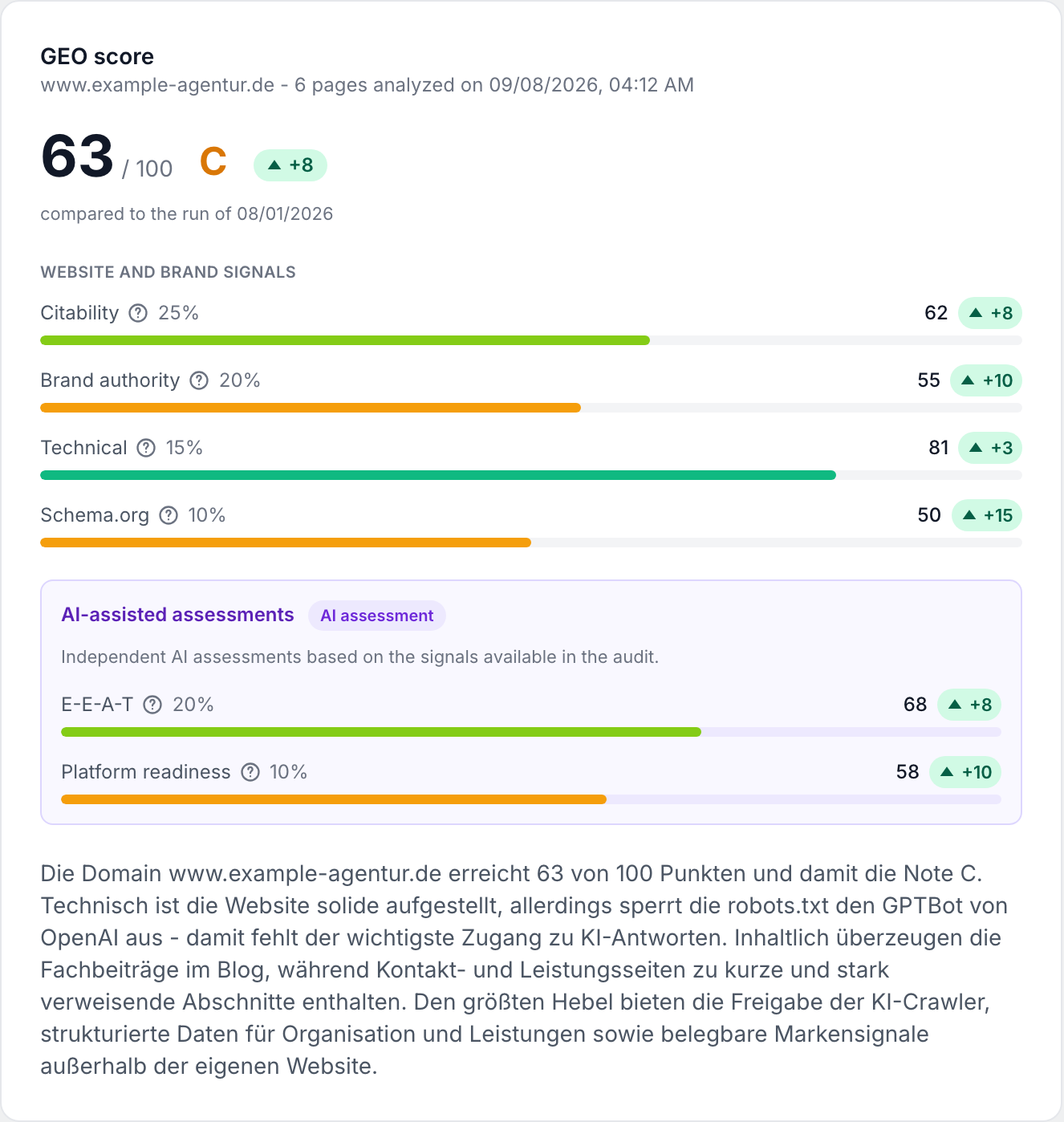
Each assessed criterion receives a score from 0 to 100. The overall score is their weighted average. Grades use the following thresholds:
- A: 85 or higher
- B: 70 or higher
- C: 55 or higher
- D: 40 or higher
- F: below 40
If an AI-assisted assessment is unavailable, the affected criterion is marked as not assessed rather than zero. The overall score is reweighted across the available criteria and the report is marked as partially assessed.
Profile options
The GEO Audit is set up in its own scan profile. There you define the brand name, the founder name, the language of the analysis and the number of pages to check; in addition, three checks can be switched off individually and the brand authority platforms selected one by one. The options are described under Scan profiles.
Token costs
The GEO Audit is billed per run, not per URL. It consists of two parts:
- Retrieval and analysis: 8 tokens per page retrieved plus a one-off 5 tokens per domain for
robots.txt,llms.txtand the knowledge-source lookup. - AI assessment: the larger share. It runs in up to five steps that assess the context of the entire domain; the fifth is the editorial plan. Their base load is incurred regardless of the page count, which is why a run over one page is barely cheaper than one over ten.
Because the second part dominates, the cost preview before the start is the authoritative figure: it states the expected consumption and the amount that will be reserved. Switching the AI assessment off in the profile leaves only the first part. Deselecting just the editorial plan saves its share.
Every page attempted is billed, including pages that could not be retrieved. If a page errors out, its tokens are spent all the same. The report footer states which model was used and how many external tokens were incurred.
What the report contains
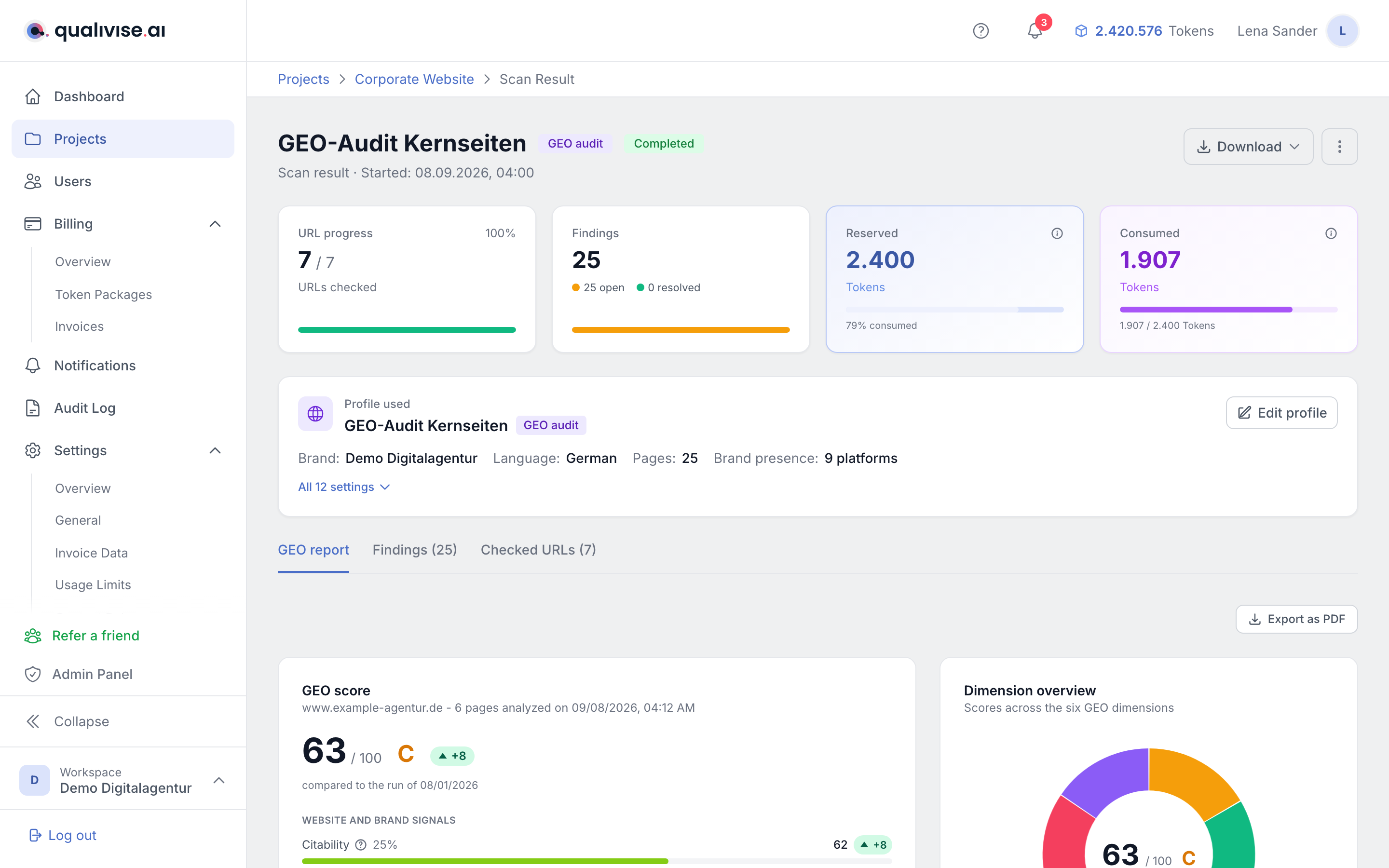
You will find the full report in the scan result on the GEO report tab. It includes:
- PDF export via the Export as PDF button, for example to pass on to clients or management.
- Change from the previous run: from the second run onwards, every value states how it developed - see below.
- llms.txt: a nine-point checklist covering title, description, structured sections, entries with a valid URL and description, key facts and contact details. The score is the share of points met.
- Brand presence: a value from 0 to 100 for every checked platform along with the metrics behind it - from Wikipedia and Wikidata through YouTube, Reddit, press, podcasts and reviews to the developer platforms. Which platforms are included is set in the scan profile; how the values are built is described in Brand authority.
- Profiles linked from the website: the platform profiles your website declares itself, from the Schema.org field
sameAsand the links of the analysed pages. - AI crawler access: a table with crawler, operator, tier, status and the applicable rule from
robots.txt. Blocked systems cannot read the content and therefore cannot cite it. What the tier means is explained by the question mark on the column and in detail in Technical readiness. - Action plan: the recommended steps, each with impact and effort (high, medium or low), so you can prioritise by benefit and feasibility.
- Editorial plan: next to the action plan, which covers technology and signals, the AI suggests the content - see below.
- Ready-to-use drafts: file drafts generated by the AI that you can copy or download. Review their content before publishing them.
- Checked pages: the strongest and the weakest pages plus the number of analyzed and failed pages.
- Notes from the run whenever something remained incomplete, for example a page limit that was reached, a
robots.txtthat could not be fetched, or an AI assessment disabled in the scan profile.
Editorial plan
The editorial plan answers the question of which content should be created or expanded next. It has three parts:
- New topics: topics the website does not cover yet, each with a rationale, a format (guide, FAQ, comparison, glossary, case study or own data), a priority and the questions the content should answer.
- Open user questions: questions users ask AI systems for which the website has no citable answer. If a target page is listed, the answer belongs there; otherwise it says new page.
- Pages to expand: pages from this run that can become more citable with moderate effort, with the issue and a recommendation.
It is based on the pages of the run and on the pages already known from earlier runs, so that no topic is suggested that already exists. Target pages and pages to expand are always real, checked URLs; the AI cannot invent addresses. Even so, everything remains a suggestion for the editorial team to judge.
The editorial plan is created for runs with the AI assessment, unless it is deselected in the scan profile. Older runs do not have one.
The project view
The GEO Audit tab of a project arranges the results by how they can be compared. Runs often check different parts of the sitemap, and that is intended. An overall score across the blog pages is therefore not comparable to one across the product pages. The view separates three kinds of results:
- Snapshot: overall score, grade and criteria of one run. By default it shows the latest run. If there are several scan profiles, choose the profile whose latest run you want to see at the top right. The comparison with the previous run only applies within the same profile.
- Domain foundation: AI crawler access,
llms.txtand brand authority. These values apply to the entire website, regardless of the page selection. They are therefore always taken from the latest run, with a traffic light, the next step and the change from the previous run. Below, the chart shows their history. - Page inventory: every page checked so far with its latest result, whichever run it came from. More on this in the next section.
Below them, the editorial plan and the action plan of the selected run sit side by side.
Page inventory
The page inventory collects the results of all runs per URL. A run over the blog therefore does not overwrite the product pages but adds to the inventory. Each page is compared with its own previous check, even if that came from a different profile.
- Key figures: number of pages, average score, citable pages (citability of 50 or higher), pages without Schema.org, pages whose content only appears via JavaScript, and outdated checks.
- Sections: the pages grouped by the first path segment, such as
/blogor/products. A language prefix is kept, so/de/blogand/en/blogare separate sections. Each section names its weak point, the weakest of the three page values citability, technical and Schema.org. A click filters the table to the section. - Table: page, score with change, the three sub-scores, open findings and the date of the check with the profile and a link into the run. You can sort by weakest or strongest score, largest decline or improvement, oldest check or most open findings.
A check counts as outdated after 30 days and is flagged. Such pages are candidates for the next run.
Findings: page or entire website
The Findings tab separates the two kinds of findings, because they are fixed in different places:
- Page-specific findings - text blocks that are too short or too long, missing Schema.org markup, technical points such as a missing page title. They sit in the card of the affected URL, together with the Re-check page button.
- Site-wide findings - the
llms.txt, AI crawler access viarobots.txt, and brand presence. They apply to the entire website and therefore sit in their own cards above the URL cards, grouped by topic. An incompletellms.txtis not a fault of one subpage but of the website.
The site-wide cards are always shown in full; they are not paginated along with the URL cards. Status and category filters apply to both areas alike. In the CSV export the Scope column states whether a finding belongs to a page or to the entire website - which is why the URL column stays empty for site-wide findings. The PDF report likewise puts them in their own sections ahead of the pages.
Comparison with the previous run
From the second run onwards the report states next to every value how it developed: for the overall score, for each of the six criteria, for the brand presence value and for every single platform. Green means it went up, red means it went down, grey means unchanged.
The comparison always uses the previous completed run of the same scan profile. That is deliberate: a profile with four platforms and 20 pages is not comparable to a profile with twelve platforms and 200 pages. Runs of a different profile are therefore left out, even if they cover the same website. The date of the run used for the comparison is shown below the score.
There are four states to distinguish:
- +8 / -6 - both runs have a value, so the difference applies.
- ±0 - the value stayed the same.
- new - assessed for the first time. This is not a rise from 0 but a new statement, for example a platform you have just enabled in the profile.
- was 70 - assessed in the previous run, not in this one, for example because a search was rate-limited or you deselected the platform. The value did not drop, it is missing.
Hovering a badge shows the full sentence with the earlier value and its date.
Notes on comparability
Sometimes a movement is not down to the website but to changed conditions. Such cases are listed as a note below the score instead of silently comparing the numbers:
- AI assessment differed - one of the two runs did not have it, so a different number of criteria went into the overall score.
- Platform selection changed - platforms were added or removed in the scan profile.
- Different number of pages checked - the runs analysed considerably different numbers of pages, for example after a change to the page limit. Small sitemap fluctuations do not trigger the note; it takes a deviation of more than 20 percent.
The PDF report carries the same information: a change column for the criteria and for the platform table, plus the comparison sentence and its notes below the score.
History across several runs
The chart in the domain foundation of the project GEO Audit tab only shows values that apply to the entire domain: AI crawler access by default, and via the selector at the top right the llms.txt, the brand value or a single platform. It deliberately does not show the overall score, because that depends on the page selection of the run, and two runs over different sections would suggest a movement that did not happen. The development of individual pages is shown in the page inventory instead.
Runs without a value for the selected series remain a gap and are not drawn as 0 - a gap is not a slump. A note below the chart points this out as soon as such a gap is present.
Using the results
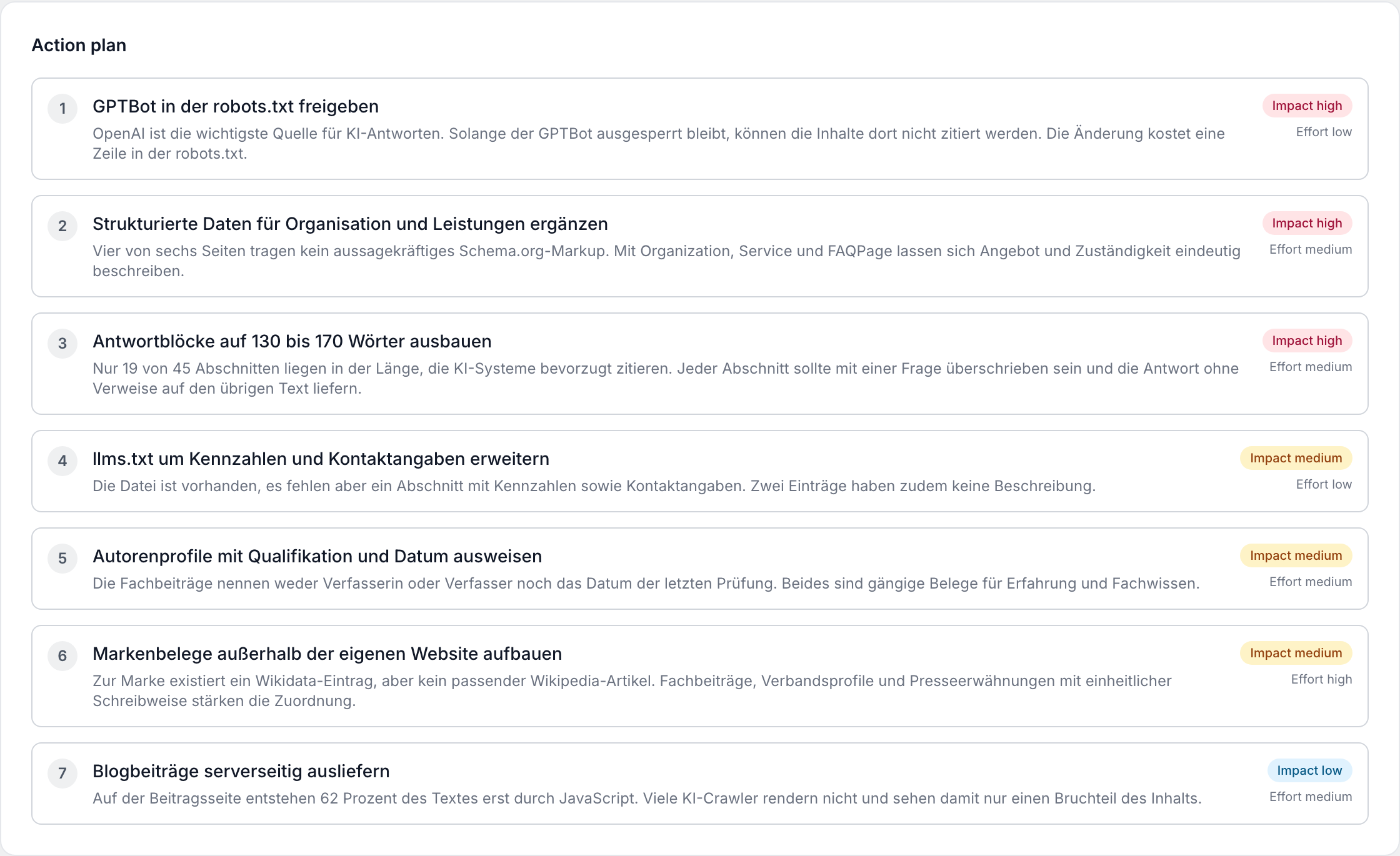
The GEO score is a prioritized assessment, not a guarantee that an AI system will mention the website. Start with low-scoring criteria that carry a high weight. Findings identify specific technical or content improvements. Run the audit again after significant changes to compare progress.