

Link Check
The Link Check verifies all outgoing links on your selected pages for reachability, redirect chains, and mixed-content issues. It runs rule-based without AI directly in the backend and is therefore particularly fast and cost-effective.
When to use Link Check
- Find dead links: External references to 404 pages, server errors, or domains that have been taken offline
- Reveal redirect chains: Multiple chained redirects (e.g. http -> https -> www -> target page) that hurt load time and SEO
- Detect mixed content: http links on an https page that trigger browser warnings
- See robots-blocked references: Links that are not allowed to be crawled according to
robots.txt - Regular monitoring: Scheduled automatic scans so outdated links are caught early
Create a scan profile
- Open your project and go to Project settings > Scan profiles to reach the profile management page
- Click New profile there (the same button is also available on the project's Overview tab)
- Select Link Check as the scan type
- Choose a name and select the source URLs to check in the sitemap tree
- Configure the link-check options (see below)
- Optional: Define a schedule for automatic scans
- Save the profile and start the first scan
Options
When creating or editing a Link Check profile, the following settings are available:
Check internal links
Include links pointing to your own domain. Enabled by default. Disable this option if you want to focus only on external links.
Check external links
Include links pointing to third-party domains. Enabled by default. Disabling can make sense if, for example, you only want to inspect your internal linking structure.
Respect robots.txt
If enabled, the Link Check verifies before each external request whether the target URL is allowed for automated tools according to robots.txt. Blocked links are reported as findings but not fetched.
Follow redirects
Enabled by default. The check follows up to 5 redirects to reach the final target URL.
Flag mixed content
If the source page is served over https and a link points to http, this is marked as a finding. Mixed content triggers security warnings in browsers.
Detect recurring navigation links
A target linked from many pages (header, footer, menu) is always fetched only once, regardless of this setting.
The switch only decides whether such a finding carries the note "navigation link: found on N pages". That helps you judge the impact: a broken link in the footer affects the whole site, a broken link in one old article affects a single page.
The option does not save tokens. Billing follows the number of links per source page, not the number of actual requests.
Maximum links per page
Limits how many unique outlinks are extracted per source page. Default: 200. Protects against very long link-list pages.
Redirect chain threshold
How many consecutive redirects trigger a finding. Default: 2.
Domain exclude list
Domains that are completely excluded from the check (e.g. tracking services, social media buttons, internal tools). Maintainable entry-by-entry.
Understanding scan results
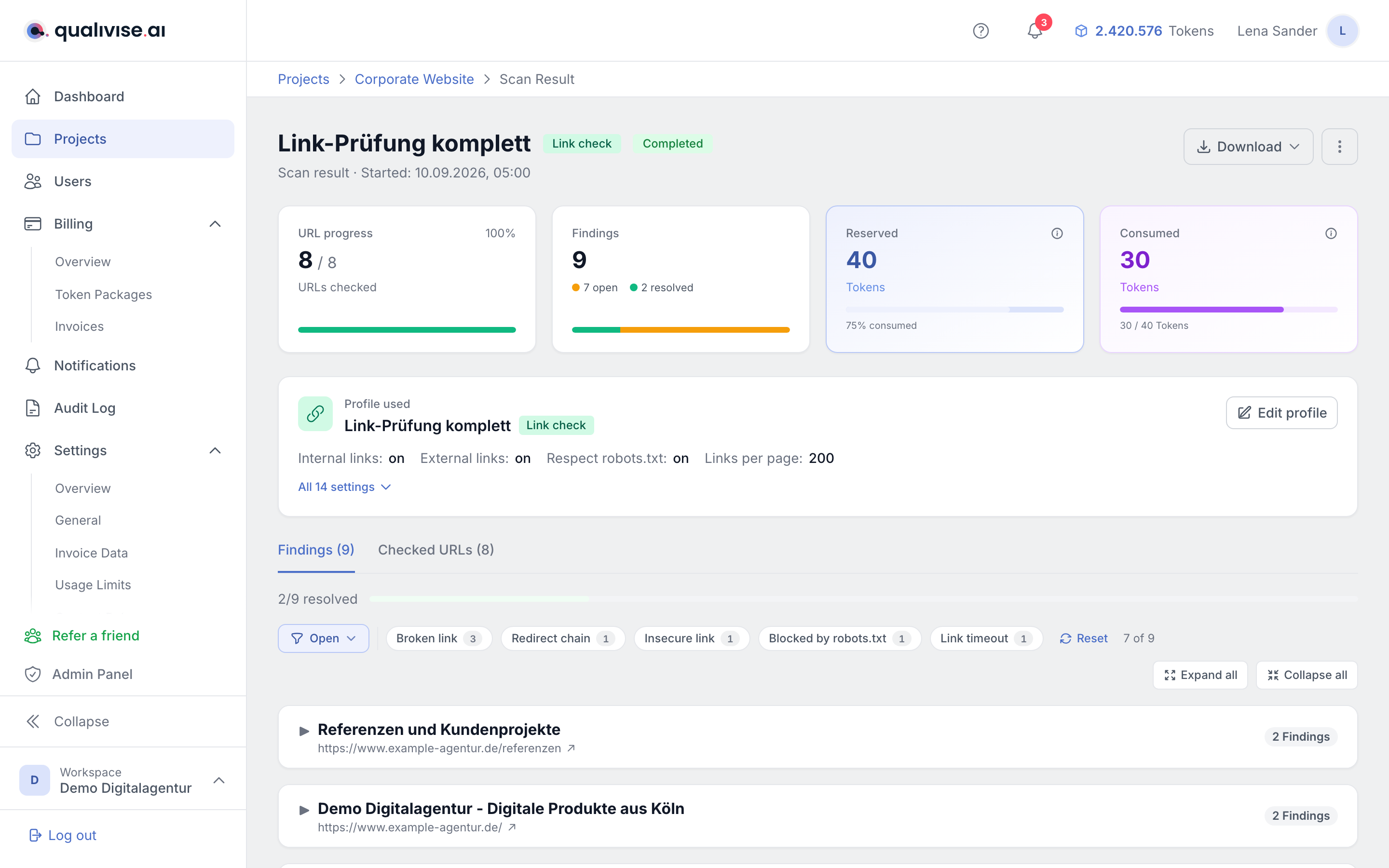
After a scan, you'll find the results in the scan detail view. Findings are grouped into categories:
Broken link
The target server returned an error status code (4xx or 5xx). The page is no longer reachable for visitors.
Timeout
The target server did not respond within the time limit (10 seconds). Possible causes: slow servers, temporary outages, blocking firewalls.
Redirect chain
The target URL redirects via multiple stations (more than the configured threshold). Recommendation: link directly to the final URL.
Insecure link (mixed content)
On an https page a link points to http. Browsers mark such pages as "not fully secure".
Blocked by robots.txt
The target URL is not allowed to be fetched by automated tools according to robots.txt. Often not an error, but useful to know.
Token costs
Link Check is billed per source page. A source page with up to 50 links costs 3 tokens. For every further 50 links (or part thereof) on the same page, 1 token is added. What counts are the distinct links found on that page; links appearing on several source pages are fetched only once, but they count towards the cost of every source page.
Two examples, each with 20 source URLs:
- 40 links per page: 3 tokens per page, so 20 x 3 = 60 tokens
- 800 links per page: 3 + 15 tokens per page, so 20 x 18 = 360 tokens. To actually capture that many links you have to raise the Maximum links per page option; the default is 200.
Exact costs are shown before the scan and tokens are reserved in advance.
Tips
- Focus on a few source URLs: Link Check is 1-hop, i.e. it only extracts links from the selected sources. Pick strategic pages (home page, main categories) instead of every URL
- Maintain a domain exclude list: Exclude domains that frequently produce false positives (e.g. tracking, social-media buttons)
- Combine with Content Health Check: While the Content Health Check finds suspicious URL patterns in the sitemap, Link Check verifies actual link targets in the pages
- Mark findings in the ignore list: Known, accepted issues (e.g. intentional redirects to login pages) can be marked as ignored - they will not appear in future scans