

Notifications
Notifications keep you up to date on relevant events in the workspace without having to check every module manually. You open the overview via the bell icon in the header; similar messages can be grouped so the list stays manageable.
Notification centre
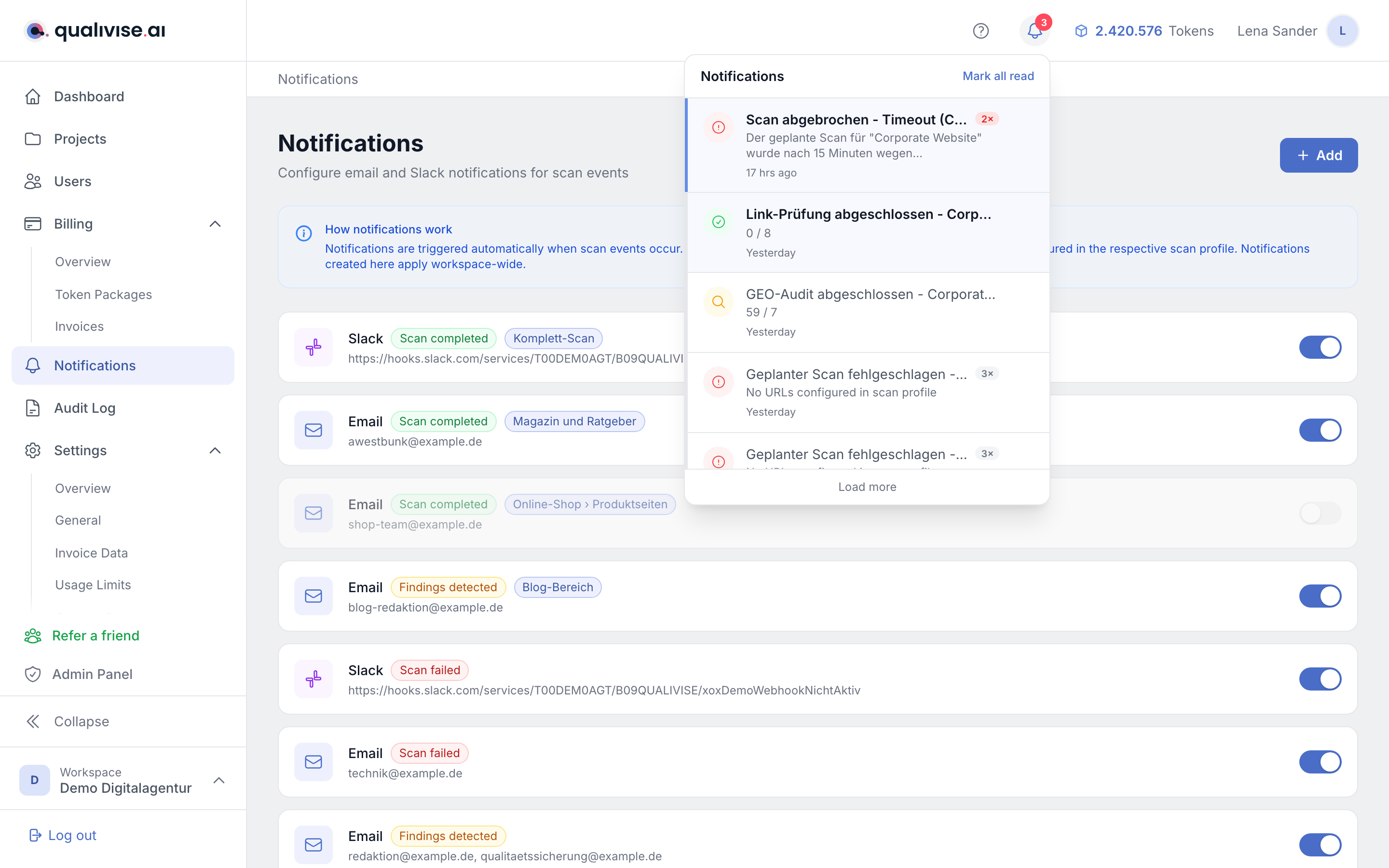
- A click on the bell opens the list of recent messages.
- Unread entries are usually highlighted; read ones appear more subdued, depending on the theme.
Grouping
- Similar notifications can be combined into a single group (e.g. several similar scan hints).
- This avoids long lists with repetitive single entries.
Automatic notification types
The platform produces automatic notifications for the following events:
Scans and results
- Scan completed - the run has finished; you can jump straight to the results.
- Scan failed - the run did not finish successfully; details are in the scan or the message.
- Findings detected - a run produced findings that are waiting to be worked on.
- Content issues detected - the content assessment found irregularities such as placeholders or test pages.
Tokens and billing
- Balance low - a hint that your token balance is running out, before runs fail because of it.
- Token purchase completed - a purchased token package has been credited.
- Auto top-up triggered - the automatic top-up bought tokens because the balance fell below the configured threshold.
- Auto top-up failed - the top-up could not be completed; top up manually and check the payment details.
Protection rules
- Guardrail warning - a configured protection rule reports a warning event.
- Guardrail blocked - an action was blocked by a rule; check context and configuration.
Projects, team and referrals
- Project deleted - a permanent deletion has finished in the background.
- Project deletion failed - the deletion did not complete; the project stays in an intermediate state until the case is resolved.
- Invitation accepted - a workspace invitation you sent was accepted.
- Referral accepted - an invited person accepted your invitation from the referral programme; the acceptance bonus has been credited.
- First-purchase bonus - a person you referred bought a token package for the first time.
System
- System message - general platform notices that don't belong to any of the other events.
Mark as read
- Mark all read - resets the state for visible messages and reduces visual noise.
- Individual messages can also be counted as read depending on the UI when you open them.
Retention and auto-deletion
- Read notifications are automatically deleted after 90 days, unread ones after 180 days, so the history doesn't grow indefinitely.
- If needed, transfer important content to tickets or documentation before it expires.
Notification rules (admins only)
/app/notificationsis not an overview of received messages but the configuration of notification rules for email and Slack. The page is only accessible to workspace admins.- See Notification management for details.
- Your own messages remain available via the bell icon in the header.
Day-to-day prioritisation
Which messages first?
- Guardrail blocked - can stop critical actions; investigate the cause before continuing.
- Scan failed - affects data quality and planning; check promptly.
- Balance low and auto top-up failed - prevent later start failures with a low balance.
- Scan completed - lets you know when new results are available.
Quiet times
- If you expect many similar messages (e.g. test runs), use grouping and mark all read to keep your head clear.
Tips
- For failed scans first read the message, then the scan detail view and check logs or guardrails if needed.
- Take messages about your balance seriously and top up in time to avoid interrupted runs.
- Remember: read notifications disappear after 90 days, unread ones after 180 days - put important facts into tickets instead.