

Ignore list
The ignore list lets you permanently suppress certain findings for a project. Patterns added to the list are no longer recorded as findings in any future scan - saving you time on recurring findings that you intentionally accept, and letting your scans reach "0 errors" again.
Important: ignored findings are not errors. They are neither counted nor shown in new scans as long as the pattern is on the ignore list.
Overview
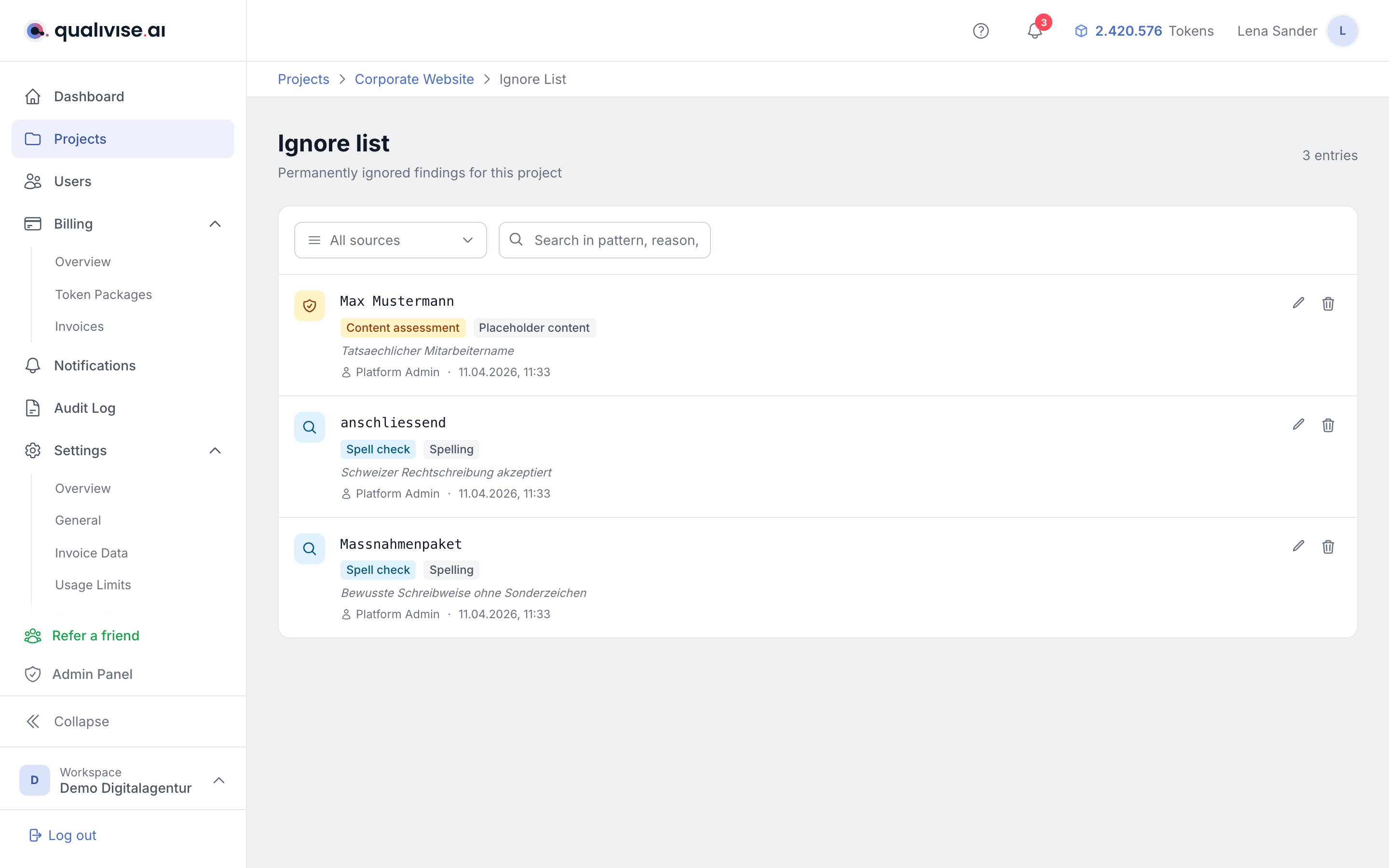
- The ignore list always belongs to a project and applies to all scans of that project.
- Entries apply to GEO audit, spell check, content assessment and link check, depending on their origin.
- The header shows the total number of entries on the list.
Create an entry
Entries are created from the scan detail view:
- Open a finding and click Ignore.
- The dialog offers the option "Add permanently to ignore list" (only for workspace owners and admins).
- Optionally, provide a reason (max. 140 characters), e.g. "brand name, intentional spelling".
- After confirmation the pattern is added to the ignore list.
Tip: the pattern is based on the original text of the finding. On future scans, identical text passages are treated as ignored automatically.
Manage entries
Filter and search
- Origin filter - show only entries from one scan type: GEO audit, spell check, content assessment or link check.
- Search field - search patterns, reasons and author names.
- Reset filters - resets all active filters to the default view.
Information per entry
Each entry shows:
- Pattern - the original text being ignored (in mono font).
- Origin - badge with the scan type: "GEO audit", "Spell check", "Content assessment" or "Link check".
- Category - e.g. spelling, grammar, typo, punctuation, suspicious URL, test page, placeholder content, broken link, llms.txt missing.
- Reason - if provided, the reason is shown in italics below.
- Author and date - who created the entry and when.
Edit and remove
- Edit reason - click the pencil icon to adjust the reason later.
- Remove entry - the trash icon deletes the entry. The pattern will be reported as a finding again on future scans.
Note: only workspace owners and admins can edit or remove entries.
Impact on scans
- Future scans - findings that match a pattern on the ignore list are not created in the first place. They don't appear in the results list, in the "open" / "resolved" metrics or in the project statistics.
- Existing scans - any "ignored" markers still present in older data are excluded from the counters as well. An older scan with, say, 7 ignored findings now correctly shows "0 findings".
- Entry removed - taking a pattern off the ignore list applies from the next scan onwards. The previously filtered findings don't reappear retroactively in old scans, but the next scan run records them normally again.
- Statistics - the project overview shows a KPI card with the total number of ignore-list entries. The breakdown below it currently only covers spell check and content assessment; entries from link check and GEO audit count towards the total but don't appear in the breakdown. The full list is available via the link to the ignore list.
Categories
The ignore list supports findings from all four scan types:
GEO audit: AI crawler blocked, llms.txt missing, low citability, Schema.org missing, weak E-E-A-T, brand gap, technical GEO finding
Spell check: spelling, grammar, typo, punctuation, other
Content assessment: suspicious URL, suspicious content, test page, placeholder content, unreachable
Link check: broken link, link timeout, redirect chain, insecure link, blocked by robots.txt
Tips
- Use the ignore list for intentional exceptions such as brand names, technical terms or deliberate spellings.
- Document the reason with a short note so team members can follow the decision.
- Review the list regularly and remove entries that are no longer relevant.
- The ignore list applies project-wide - an entry is valid for all scan profiles of the project.