

Scan profiles
A scan profile defines which URLs of a project are checked with which scan type and on which schedule. Every check in qualivise.ai runs through a profile, whether you start it by hand or have it run automatically.
Profile overview
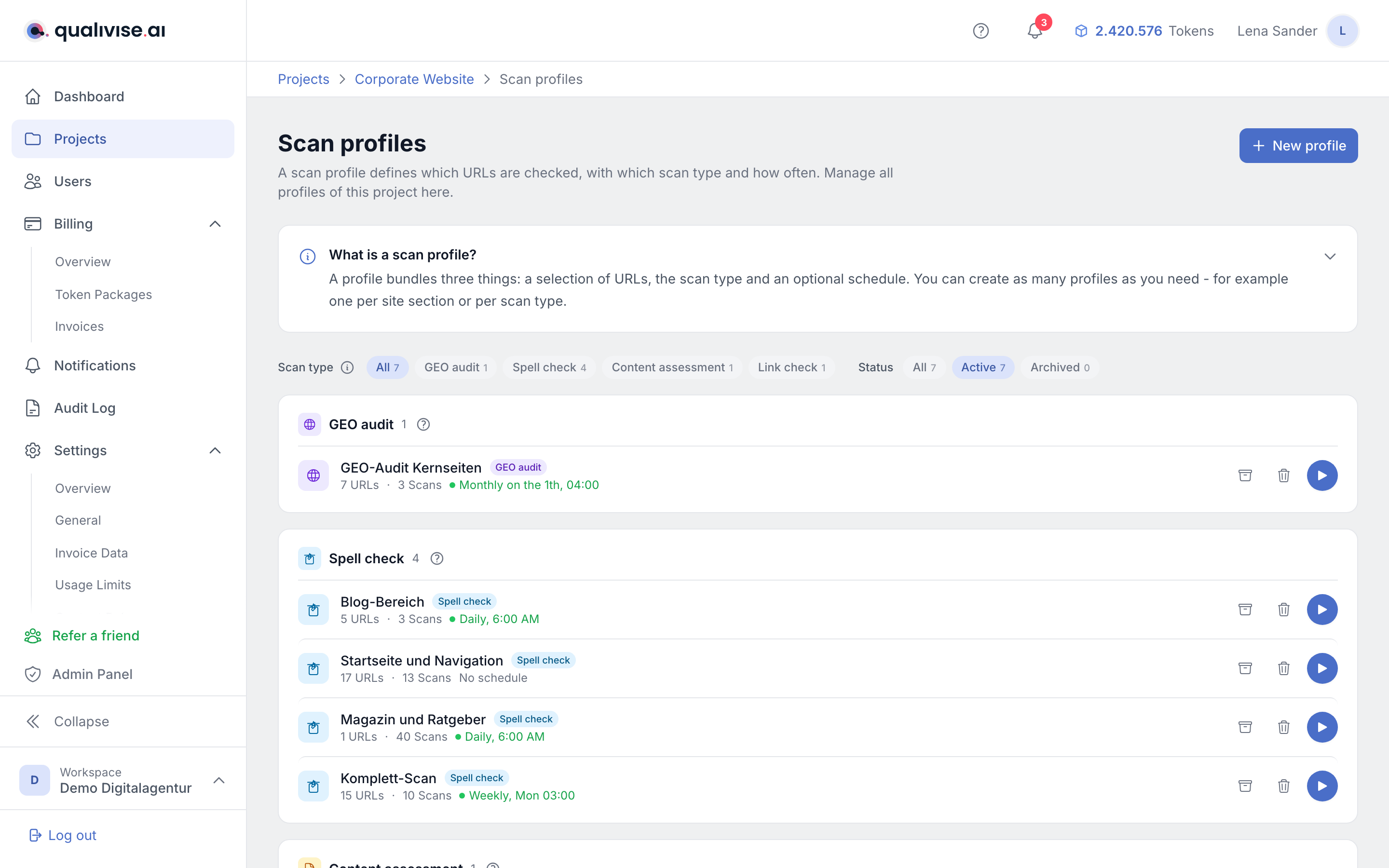
- Every profile belongs to a project and refers to the sitemaps and URL sets stored there.
- You can create as many profiles per project as you like, for example for different sections of the site or different check intervals.
- Each scan type needs its own profile, because the scan type cannot be changed afterwards.
Managing profiles

The project overview only shows the five most recently edited profiles as a short list. Full management lives on a dedicated page:
- Open it via the Project settings button at the top right of the project view (entry Scan profiles) or via the Manage all scan profiles link below the short list.
- The list is grouped by scan type and can be filtered by scan type and status (active, archived). Every filter value shows how many profiles it matches.
- The selected filter is stored in the address bar, so a bookmark or a shared link returns to the same view.
- An introductory section explains the four scan types with token cost and speed. It is expanded as long as the project has no profile yet.
- Archiving, deleting and restoring are only available on this page. The project overview only lets you start a scan.
Scan type
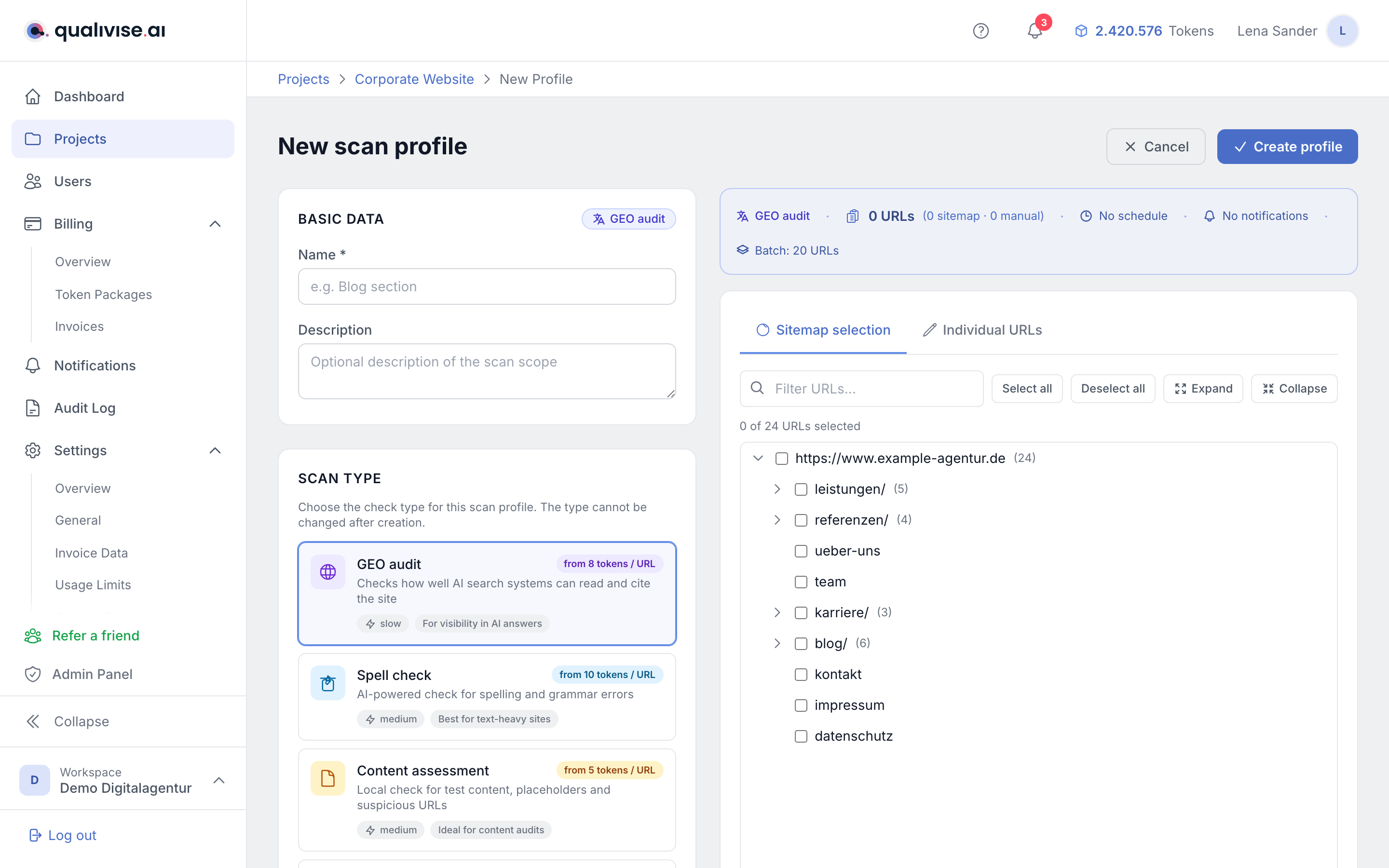
When you create a profile you choose the desired scan type:
- Spell check - AI-assisted check for spelling, grammar, typos and punctuation. Token cost depends on the text volume of the checked pages, with a minimum of 10 tokens per URL.
- Content assessment - rule-based check for test content, placeholder text and suspicious URL patterns. Flat cost of 5 tokens per URL, which makes it especially cheap for recurring checks. See Content assessment.
- Link check - checks every link on a page for reachability, redirect chains and insecure references. Costs 3 tokens per source page plus 1 token per additional 50 links. See Link Check.
- GEO audit - examines how well the site is prepared for AI answer engines and returns a score from 0 to 100. Costs 8 tokens per page plus a one-off 5 tokens per domain; when the AI analysis is enabled, the tokens of the AI provider are added. See GEO Audit.
Not every scan type is available everywhere: link check and GEO audit have to be enabled for your workspace, and within a project admins activate the scan types they need in the project settings. If a scan type is not active in the project, the profile editor points this out and a scan cannot be started.
Tip: combine the scan types for comprehensive quality assurance - spell check for linguistic correctness, content assessment for structural issues in your own content, link check for the quality of your links, and the GEO audit for visibility in AI answers.
Additional settings per scan type
Spell check and content assessment need no further input. The other two scan types are configured in the profile:
- Link check - whether internal and external links are checked, whether robots.txt is respected and redirects are followed, from which length a redirect chain is reported (default: 2), how many links per page are checked at most (default: 200) and which domains stay excluded.
- GEO audit - brand name (the project name is used if left empty), founder name (optional), language of the analysis (German or English) and the number of pages to check (default: 25, at most 100). In addition, the render dependency check, the search for the brand in knowledge sources and the AI-assisted analysis can each be switched off. With the AI analysis on, it also produces an editorial plan with topic suggestions; this step can be deselected as well if you only need the assessment.
Brand authority platforms
With the brand search active, you select below which platforms are checked - from Wikipedia and Wikidata through YouTube, Reddit, press, podcasts and reviews to LinkedIn and Quora. Deselected platforms are not queried and do not lower the value: brand authority is normalised across the platforms actually checked.
The developer platforms GitHub, Stack Overflow and Hacker News sit in a group of their own and are off by default. For most brands a missing GitHub organisation says nothing; for technical products it is worth enabling them.
The founder name adds a search for a Wikipedia article about that person. The hit does not count towards brand authority but towards E-E-A-T. How the individual values are built is described in Brand authority.
If you select no platform at all, the profile points this out. The run stays valid, but brand authority remains unassessed.
URL selection from the sitemap tree
- Navigate through the sitemap tree and select the URLs or branches this profile should cover.
- URLs that are not selected will not be checked by this profile.
Manual URLs
- Add manual URLs if individual pages are not part of the sitemap or should be checked in addition on purpose.
- Make sure to enter full paths and the correct scheme (http/https) so you don't trigger false matches.
Automation
- Use a schedule to define when and how often a profile runs automatically. Weekly, daily, every twelve hours and every six hours are available as presets; beyond that you can enter your own cron expression.
- Once configured, scans start fully automatically at the defined time - no manual intervention is needed.
- If the token balance is not sufficient for a scheduled run, the scan is not started and you receive a notification. Auto top-up avoids this.
Skip unchanged pages
- When skip unchanged pages is active (the default), a run only checks pages whose modification date in the sitemap is newer than the last scan.
- This saves considerable amounts of tokens on recurring checks. Skipped pages are reported separately in the scan result.
- Switch the option off if your sitemap does not provide a reliable modification date or if you deliberately want to check everything again.
Refresh the sitemap before a scan
- On request, qualivise.ai reloads the stored sitemaps immediately before every run. That way freshly published pages enter the check without manual work.
- Use path prefixes to narrow down which areas are taken into account, for example only
/blog/.
Batch size
- The batch size limits how many URLs are processed per sub-job. The default is 20 URLs, values from 1 to 100 are possible.
- Smaller batches spread load and token usage more evenly; larger batches can be more efficient on stable sites.
Notifications per profile
- Right in the profile you define who is informed by email when a scan has completed, has failed or has reported findings.
- This setting applies to this one profile only. Workspace-wide rules, including Slack, are maintained by admins under Notifications.
Find the settings again in the result
Every run records the settings that applied when it started. They appear on the result page in the Profile used card, together with a link back into this editor - see Scans & results.
That is why a change here does not affect scans that have already run: older reports keep showing the values they came about with. Only the next run picks up the new state.
Archive unused profiles
- Archive profiles you no longer actively use to keep the list clean. Archived profiles no longer execute scheduled runs.
- The scans and findings already produced are preserved and stay accessible.
- Use the archived status filter to find these profiles again and restore them when needed.
Check dependencies
- A profile without a valid sitemap analysis or without a matching project URL doesn't deliver meaningful runs.
- When URLs disappear from the tree (404 in the source), update the sitemap and the selection in the profile.
Roles and permissions
- The roles owner, admin and member have access to scan profiles. With the read-only role the profile list cannot be opened.
- Which scan types are available in a project is decided by admins in the project settings.
- Whether a scan can be started does not depend on your role but on whether the project is active and the scan type is enabled.
Notes
- Adapt automation and batch size to the size of the site and to your token budget.
- After changes to the sitemap check whether the URL selection in the profile is still correct.
- After creation, run one manual scan once before enabling a frequent automation.