

Getting Started
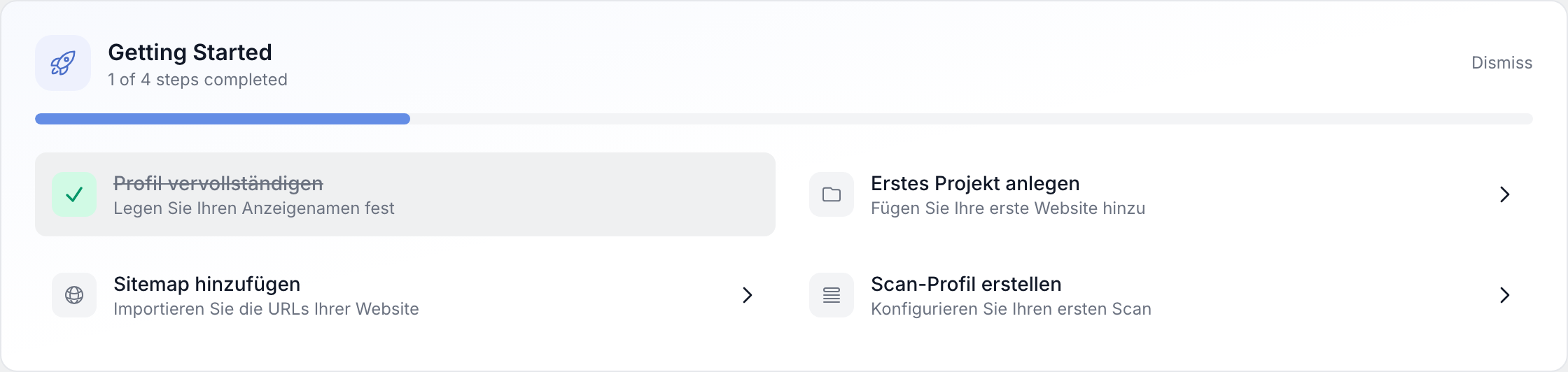
After signing up, the onboarding checklist helps you quickly complete the most important setup steps. Progress is calculated automatically as you finish each task. You can hide the checklist and show it again later without losing any progress.
Checklist overview
The checklist appears prominently on the dashboard and shows four related steps. Each step is linked to a clear action that you can trigger directly from the UI.
- Progress is shown as a percentage or as completed steps, depending on your version.
- Completed steps are marked as done; open steps stay visible until they are fulfilled.
The four steps in detail
Complete your profile
- Add any missing profile data so that display name, avatar and context are correct throughout the application.
- A complete profile also makes collaboration easier when several people work in the same workspace.
Create your first project
- Add a website as a project (name and base URL).
- Without a project, later steps such as sitemap and scan profile cannot be used meaningfully.
- For members with a restricted role this step is called Receive project assignment instead: admins create the projects, and the step counts as done as soon as at least one project has been assigned to you.
Add a sitemap
- Link the URL of your
sitemap.xml(or sitemap index) so the URL structure can be analysed. - The analysis is the foundation for selecting URLs in scan profiles.
Create a scan profile
- Define which URLs from the sitemap are checked how (selection, schedule, scan type).
- With an active scan profile you can start your first scans and evaluate the results.
Progress and visibility
- Progress updates automatically as soon as a step meets the criteria.
- You can hide the checklist if you want to use the full dashboard area.
- From the same place you can show the checklist again whenever you need a reminder.
What happens after completion?
- The checklist can be hidden or kept as completed; the dashboard remains your central overview.
- You can create additional projects, sitemaps or scan profiles at any time, regardless of the checklist.
Tips and notes
- Work through the steps in order if possible - they build on each other both technically and conceptually.
- Skipped tasks remain open until you complete them; nothing is enforced without your action.
- If you are an experienced user you can move through the steps faster, but make sure the project and sitemap are really set up correctly.
- Team members should only consider the checklist as "completed" per person when their own profile and access steps are in place.